Showing posts with label Windows 10. Show all posts

The ultimate solution to get rid of huge files downloaded by the Windows 10

The ultimate solution to get rid of huge files downloaded by the Windows 10

Here's the ultimate solution to get rid of the huge files that the Windows downloaded without your knowledge and that up to 6GB (Windows 7,8,8.1)


At the end of last week was the news shocking deployment completely and is that Microsoft company you download files on Windows 10, without the knowledge of users of Windows 7.8, 8.1 and up to nearly 6GB of storage space located on your computer as it considers this a very large space Imagine with me 6GB of files that are not used as it is one of the remnants of the system is sufficient to work with 7, 8, or 8.1 also without having to download files, Windows 10 if we want to work on this the last we'll install it really essential as a system, not less, and no more!


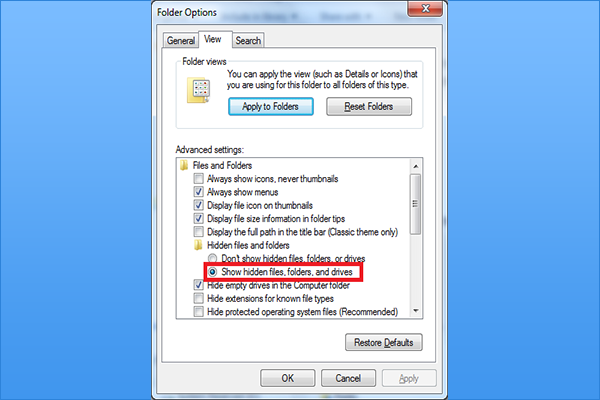
Microsoft recently sync with the official announcement of Windows 10 and did not stop to hear new news concerning privacy As if you see us how very large company and charge you upload files with an area 6GB without taken it regardless of Brothers who had access to the throughput weak and the others who are present areas remote ... but on the whole this is not our subject and not 'to rebuke Microsoft' on the actions that you make, you should know that HTH files that automatically assume the order of Microsoft are hidden from you so the first thing we should do is to remove the blocking for files hidden and so go to 'This PC' or 'Computer' by quality version on the Windows version you are working on and then press the ALT button then Seidahr you bar at the top of the window and so go to 'Tools' then 'Folder options' and you'll see settings files on this form:

When you simply will sink to the bottom a bit and activate the option 'Show hidden files, folders, and drivers' then-click on the 'Aplly' in order to confirm the operation then OK, and so you've first step, which will enable you to Adhar hidden files be Windows on your own this mean for owners of Windows 7 for users of Windows 8 and 8.1 somewhat different way in and to shorten the explanation let's you and that was the explanation:


After the application of what's in this window will show you as if you Dahrt issue in Windows 7 and thus the application process, which has already been explained and that there is nothing wrong in writing and presented to you in the form of an image shown and also simplified


Now all you have to do is to open the 'Control Panel' and then go to the Department of 'Programs' and choose 'Install Updates' or updates that are already loaded on the device and then you open a new notebook you type the phrase 'KB 3035583' and then refer to updates and looking carefully and patiently for you to update number KB 3035583 when you find your number delete it.
Read More

Games Contest

Games Contest

Earn Money

1- Pass the survey


2- download the file


3- between the image of your screen in the comment


4- love on comment


5- Page sharing between friends


Read More

Windows 10 is used on more than 5% of desktops

Windows 10 is used on more than 5% of desktops

Study: Windows 10 is used on more than 5% of desktops


Windows 10 system from Microsoft occupied the fourth place in the list of most operating systems commonly used desktop computers according to a study prepared by NetMarketShare company specialized in devices that surf the Internet analysis.
Windows and share amounted to 5.21% ahead of Windows 8 and systems Yosemite OS X, comes behind Windows 8.1, which ranked first followed by Windows XP and Windows 7.
Microsoft Windows 10 launched officially on 29 of the month of July last and managed to reach the fourth place in just one month ahead of Windows 8 system, which earned a share of 1% further its launch one month three years ago.
Microsoft is betting on Windows 10 and dramatically after the failure of Windows 8, where the re-start menu and improve the system interfaces, as well as providing new features to provide a unique experience that allows the use of the system and its applications run on different devices with ease.
The study pointed out that it can not be compared to Windows 10 to Windows 8, especially that the latter was not free and was available in the amount of $ 40 in the first months and then its price reached $ 120 for the regular version and $ 200 for the Pro version.
Microsoft said in the 31 of the month of July of this year that Windows 10 system is installed on more than 14 million device after 3 days of its official release, and the figure rose to up to 75 million after a full month.
The study added that Windows 7 is one of the most commonly used systems to surf the Internet around the world with a share of 57.6%, followed by Windows XP's share of 12% and Windows 8.1 to 11.4%.
Edge got the default browser in Windows 10 on a 2% share in the browser market from Microsoft in an attempt to return the best browser after many of them complained about the problems that Internet Explorer users.
The Microsoft Corp. launched a review next version of Windows 10 system after less than a month after its official release, which added a range of features and worked to solve a lot of problems in the first version.


Read More

Free software to install on Windows 10

Free software to install on Windows 10

Free software to install on Windows 10


Discover a selection of free software and essential to install on your PC to start with Windows 10.


You plan to upgrade your PC to Windows 10? Before you step into the intricacies of the new Microsoft operating system, remember to equip you with the tools to make satisfactory use of your experience. Writing Telecharger.com reviewed for you software compatible with Windows 10 installed. Backup your old system to ensure safety, use a media center, through the maintenance and protection of your PC, you will find in the lines that follow a survival kit for your path in Windows 10 takes place under the best auspices.


Save your old system

Before you take the plunge and install Windows 10 on your machine, perhaps it is prudent to make a backup of your system. This could indeed prove beneficial in case of problems during the installation of Windows 10, or if you simply do not enjoy the new Microsoft system and want to go back. For this, several solutions available to you. The first is EaseUS System GoBack Free. Installed on your Windows PC 7/8, the program will load a few clicks to perform a backup of your system in its current state. If Windows 10 to update goes wrong or does not satisfy you fully, one click is enough to EaseUS System GoBack Free for you to go back and restore your settings and your applications without going through resettlement box.


 Alternatively, Macrium Reflect Free. This program allows you to simply create a clone of your hard drive that can be used to restore your old alike including system settings, documents, and applications.
 EaseUS GoBack Free Download System 
Download Macrium Reflect Free 


Browse the web

If upgrade your system to Windows 10 is a good opportunity to test Edge, replacing fire Internet Explorer, it may be that you want to keep your old habits in a browser that you are most familiar. Whether Mozilla Firefox or Google Chrome, these two browsers are already compatible with Windows 10. By continuing to use, you can still enjoy thousands of extensions allowing them to expand their features. However, Microsoft had announced that Chrome and Firefox extensions are compatible with the new browser, but the latter being in its infancy, it will leave a few weeks or months, to developers to modify the code lines that will allow their extensions to run on Edge.


Protect your PC from threats

Unfortunately, upgrading to Windows 10 still does not immunize you against viruses and other online threats bellicose. To protect yourself from this kind of inconvenience, install antivirus like Avast or Avira is recommended. Your computer is protected in real time, so you do a nasty infection (worms, rootkits, trojans, etc.) that may require a complete reinstallation of your machine. You can complete your protective armor by installing Malwarebytes Anti-Malware, a utility capable of finding the most vicious malware that are installed without your knowledge in the depths of your hard drive.  


 Download Malwarebytes Anti-Malware


Maintain your machine and optimize its performance

PC he will support Windows 10? The minimum hardware recommendations that Microsoft recommends to install Windows 10 are clear: processor 1GHz or higher, 1GB of RAM and 16GB of storage space for Windows 10 32-bit version and at least 2 GB RAM and 20 GB of storage for 64-bit graphics card that supports DirectX 9 and a screen resolution of 1024x600 pixels minimum.If you meet these criteria narrowly, with CCleaner you will find an ally of choice to support you in maintaining your PC. Piriform The utility will first help you clean your system by deleting unnecessary data that can clog your hard drive and slow down your system: web browsing history, cookies, temporary files, recycle bin, clipboard content, etc. CCleaner allows you at the same time to carry out a cleaning of the registry and assists in the management of active programs at startup, or duplicate files to delete.

 Download CCleaner 


Use office tools

With Office 365, it is now possible to automatically get the latest updates to the Office suite, and access to Word, Excel and PowerPoint files from anywhere enjoying 1TB of storage onedrive. Attractive, however, this formula requires that you purchase a monthly subscription. Also, if you prefer to opt for a free and open source solution, lean for LibreOffice or OpenOffice. Similar to the Microsoft suite, these two office suites demonstrate a sufficiently high professional quality to compete seriously enable Office 2013 and 2016. Among the most important tools in LibreOffice and OpenOffice include a text editor compatible with .doc and .docx formats, spreadsheet manager .xls and .csv formats, and a presentation tool .ppt and .pptx supporting formats.


Download OpenOffice 


Discuss with your family

Besides monitoring, maintenance, office and graphics, your PC is positioned as a true communication tool that helps you keep in touch with friends and family when your phone plan does not allow it. To reach a person at the other end of the world without breaking the bank, you can count on Skype. Owned by Microsoft, that instant messaging and video conferencing software offers you the opportunity to discuss free and easily with friends, family or in a professional setting. Another welcome feature: Skype support group communications. You are thus able to incorporate an audio or video conversation several people, regardless of geographical location and type of Internet connection each.

 Download Skype 
Read More

You can wake your PC by voice with new chips from Intel

You can wake your PC by voice with new chips from Intel

Windows 10: You can wake your PC by voice with new chips from Intel


His machine out of his waking her with a single voice, it will be possible with the Wake-on-Voice feature of Skylake Intel platform, combined with the new OS Windows 10.

"
Hey Cortana , wake up!". At the Intel Developer Forum, Intel teams have done an amazing display this week: wake his PC to his voice.

Operation only possible by combining Windows 10 Skylake the new Intel processor. Wake-on-Voice feature of the chip makes it possible for the device to remain in permanent state of alert, even in standby.

The secret is a new integrated on-chip DSP, able to hear your voice permanently (the paranoid will be delighted) and wake Windows 10. However, no details on the materials needed to make it work or energy consumption -forcément slightly supérieure- such a function.


Read More